Dark Mode vs. Light Mode: Which is Better for Your Productivity?

💡 Light mode or 🌙 dark mode for coding? The debate continues! We've created a comparison table to help you decide which mode is right for you. Check it out and let us know which side you're on!
| Topic | Dark Mode | Light Mode |
| Eye Strain and Fatigue | ✅ Reduced eye strain and fatigue, especially when working for extended periods of time | ❌ Can cause eye strain and fatigue when working for extended periods of time, especially in low-light environments |
| Color Representation | ❌ May not accurately represent color accuracy, especially in situations where accurate color representation is important | ✅ Generally provides more accurate color representation |
| Compatibility | ❌ May not be compatible with certain applications or websites that are optimized for Light Mode | ✅ Generally more compatible with applications and websites |
| Visibility | ✅ Can be less visible in bright environments, making it more difficult to read or distinguish certain elements on the screen | ✅ Better visibility in bright environments, such as outdoors or in direct sunlight |
| Blue Light Emission | ✅ Reduced blue light emission, which can disrupt sleep patterns and cause eye strain | ❌ Increased blue light emission, which can disrupt sleep patterns and cause eye strain |
| Contrast | ✅ Increased contrast between text and background, making it easier to distinguish elements on the screen | ✅ Better visibility in bright environments, such as outdoors or in direct sunlight |
| Visual Artifacts | ❌ Can cause visual artifacts, such as banding or dithering, which can be more noticeable in darker environments | ✅ Can reduce the appearance of visual artifacts, such as banding or dithering, which can be more noticeable in darker environments |
| Aesthetics | ✅ Can enhance the look and feel of certain types of content, such as photography or video | ✅ A more familiar and traditional look, which may be preferred by some users |
| Accessibility | ❌ May not be ideal for certain types of content, such as photography or video, which may require accurate color representation | ✅ Generally easier to read for people with certain types of color vision deficiencies |
So, as you can see, there are pros and cons to both Dark Mode and Light Mode. Ultimately, the decision should be made based on your specific needs and preferences as a developer. Maybe try experimenting with both modes and see which one works best for you. Happy developing!
Thanks for reading
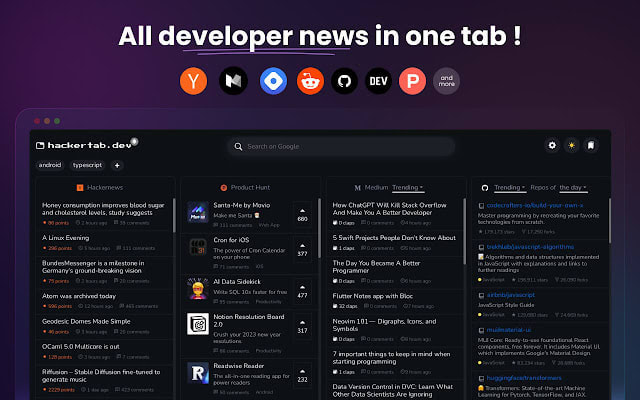
All Developer news in one tab!
As a developer, it can be difficult to stay on top of everything happening in the field. Hackertab makes it easy by allowing you to customise your default tab page to include news, tools and events from top sources such as GitHub Trending, Hacker News, DevTo, Medium, and Product Hunt.
About the author
All Developer news in one tab!
Comments
Join the discussionNo comments yet. Be the first to comment.